AVIF Format Guide
AVIF (AV1 Image File Format) is the newest major image format, first released in 2019. Based on the royalty-free AV1 video codec developed by the Alliance for Open Media (including Google, Mozilla, Apple, and Netflix), AVIF delivers the best compression efficiency of any widely supported image format — often producing files 50% smaller than JPG at the same visual quality.
What Is AVIF?
AVIF is an image format derived from the AV1 video codec, which was designed from the ground up to be royalty-free. The Alliance for Open Media (AOMedia) — a consortium of major tech companies — developed AV1 as a successor to VP9, specifically to avoid the patent licensing issues that have plagued HEVC/H.265.
AVIF uses a highly sophisticated compression pipeline that includes intra prediction with over 50 directional modes, multiple transform sizes (from 4x4 to 64x64), loop filters and constrained directional enhancement filters for artifact reduction, and film grain synthesis that can reproduce the natural texture of photographs. These techniques work together to achieve compression ratios that surpass both JPG and WebP significantly.
Beyond compression, AVIF supports an impressive range of features: 10-bit and 12-bit color depth for HDR content, wide color gamut (BT.2020), alpha transparency, image sequences for animations, and multiple color spaces. It also supports both lossy and lossless compression modes, making it versatile enough to replace both JPG and PNG in many scenarios.
When to Use AVIF
- Performance-critical web pages — AVIF's superior compression directly improves Core Web Vitals metrics like Largest Contentful Paint (LCP).
- Bandwidth-constrained environments — mobile networks, emerging markets, and any scenario where smaller files mean a better user experience.
- HDR photography — AVIF supports 10-bit and 12-bit color depth and wide color gamuts, making it ideal for displaying HDR content on capable screens.
- When maximum quality at minimum size matters — AVIF consistently outperforms JPG, WebP, and even HEIC in compression benchmarks.
- Modern web applications — if your target audience uses up-to-date browsers, AVIF provides the best image delivery format available.
Pros
- Best-in-class compression — 50% smaller than JPG and 20% smaller than WebP at equivalent visual quality
- Royalty-free — no licensing costs, unlike HEIC's HEVC codec, encouraging broad adoption
- HDR and wide color gamut support — 10-bit and 12-bit color depth, BT.2020 color space
- Supports both lossy and lossless compression, transparency, and animation
- Backed by major tech companies — Google, Apple, Mozilla, Netflix, and others ensure continued development
Cons
- Slow encoding speed — AVIF compression is computationally expensive, taking significantly longer than JPG or WebP to encode
- Browser support is growing but not universal — older Safari versions and some mobile browsers may not support it
- Limited support in image editing software — many desktop applications cannot yet open or save AVIF files
- Maximum image dimensions can be limited in some implementations, requiring tiling for very large images
- Decoding can be slower than JPG or WebP, potentially affecting rendering performance on low-power devices
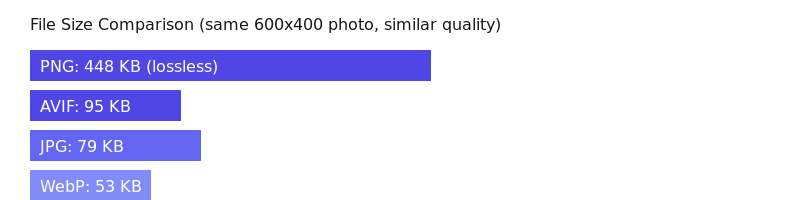
AVIF vs Other Formats
AVIF vs JPG: AVIF produces files roughly 50% smaller than JPG at the same visual quality. The difference is particularly dramatic at medium quality settings and for images with gradients. JPG remains more widely compatible, but AVIF is the technically superior format.
AVIF vs WebP: AVIF achieves about 20% better compression than WebP on average, with the gap widening for photographs. WebP encodes faster and has slightly broader browser support. For new projects targeting modern browsers, AVIF is the better choice.
AVIF vs HEIC: Both formats achieve similar compression ratios, but AVIF is royalty-free while HEIC requires HEVC licensing. AVIF also has better web browser support. AVIF is the clear winner for web use cases and is likely to supersede HEIC over time.
AVIF vs PNG: AVIF lossless mode produces files comparable to or smaller than PNG, while AVIF lossy mode can produce dramatically smaller files for photographic content. AVIF also supports transparency. PNG remains relevant for its universal compatibility and tooling support.
AVIF Adoption and Browser Support
AVIF support has grown rapidly since its introduction. Chrome has supported AVIF since version 85 (2020), Firefox since version 93 (2021), and Safari since version 16.4 (2023). As of early 2025, AVIF is supported by approximately 93% of browsers in use worldwide. Major platforms like Netflix, Facebook, and Cloudflare have adopted AVIF for image delivery, signaling its growing maturity as a production-ready format.
How to Convert AVIF Files
ImgForge makes AVIF conversion simple. Upload any image — JPG, PNG, WebP, HEIC, or another format — choose AVIF as the output to get maximum compression, or convert an AVIF file to JPG or PNG for broader compatibility. All processing happens securely on our servers with immediate file deletion after download.