WebP Format Guide
WebP is a modern image format developed by Google in 2010 that provides superior compression for web images. It supports both lossy and lossless compression, transparency, and animation — all in a single format. WebP images are typically 25-35% smaller than equivalent JPG files and 26% smaller than PNG files, making it the format of choice for performance-focused websites.
What Is WebP?
WebP is an image format based on the VP8 video codec (lossy mode) and a dedicated algorithm (lossless mode). Google created it specifically to make web pages load faster by reducing image file sizes without compromising visual quality. The format is maintained as an open standard under a BSD-style license.
In lossy mode, WebP uses predictive coding — the same approach used by the VP8 video codec — to compress images. It predicts each block of pixels based on surrounding blocks and only encodes the difference. This prediction-based approach achieves better compression than JPG's DCT-based method, particularly at lower quality settings where JPG tends to produce blocky artifacts.
In lossless mode, WebP uses a combination of advanced techniques including spatial prediction of pixels, color space transforms, use of a color cache for recently used colors, and backward-reference encoding. Together, these techniques typically achieve 26% better compression than PNG. WebP also supports lossy transparency (alpha channel with lossy compression), which is unique among common web formats.
When to Use WebP
- Website images — WebP delivers the best combination of quality and file size for modern web pages, improving Core Web Vitals and page speed scores.
- Mobile applications — smaller file sizes mean less bandwidth usage and faster loading on cellular connections.
- E-commerce product images — faster image loading directly impacts conversion rates and user experience.
- Web graphics with transparency — WebP supports alpha transparency with much smaller file sizes than PNG.
- Simple web animations — animated WebP files are significantly smaller than equivalent GIF animations.
Pros
- Excellent compression — 25-35% smaller than JPG and 26% smaller than PNG at equivalent quality
- Supports both lossy and lossless compression in a single format — no need to choose between JPG and PNG
- Alpha transparency support — even in lossy mode, a unique advantage over JPG
- Animation support — a modern, more efficient alternative to GIF animations
- Broad browser support — supported by Chrome, Firefox, Safari, Edge, and all modern mobile browsers
Cons
- Not universally supported in desktop applications — some older image editors and viewers cannot open WebP files
- Lossy WebP at very low quality can produce different artifacts than JPG — some users prefer JPG's degradation pattern
- Maximum image dimensions of 16383 x 16383 pixels — not suitable for extremely large images
- No CMYK color space support — not suitable for print production workflows
- Still not accepted by all social media platforms and content management systems for uploads
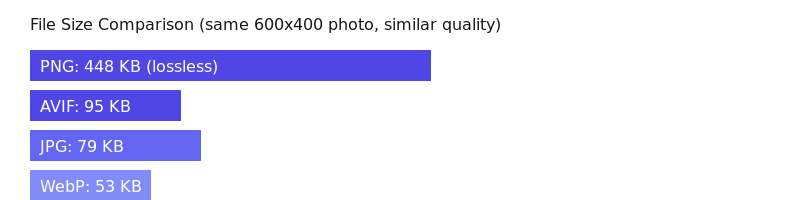
WebP vs Other Formats
WebP vs JPG: WebP consistently produces smaller files than JPG at the same visual quality — typically 25-35% smaller. The difference is most noticeable at medium quality settings. JPG has broader compatibility with legacy software, but for web delivery, WebP is the better choice.
WebP vs PNG: WebP lossless is about 26% smaller than PNG. WebP also supports lossy compression with transparency, which PNG cannot do. If your target is the modern web, WebP is almost always preferable to PNG.
WebP vs AVIF: AVIF generally achieves 20% better compression than WebP, especially for photographs. However, WebP has broader browser support and faster encoding speeds. WebP is the safer choice today, while AVIF represents the future.
WebP vs GIF: Animated WebP files are dramatically smaller than GIF — often 64% smaller for the same animation. WebP also supports more than 256 colors and alpha transparency, making it superior to GIF in every technical aspect.
Browser Support for WebP
As of 2025, WebP is supported by over 97% of browsers in use worldwide. Chrome has supported it since 2014, Firefox since 2019, and Safari since 2020 (macOS Big Sur / iOS 14). The only notable holdout is Internet Explorer, which has been discontinued. For the vast majority of web projects, WebP can be used without fallbacks.
How to Convert WebP Files
With ImgForge, converting to and from WebP is effortless. Upload any image — JPG, PNG, HEIC, or another format — select WebP as the output, and download your optimized file instantly. You can also convert WebP to JPG or PNG if you need broader compatibility for sharing or editing in older applications.